Testing Docling OCR on a Soviet Cookbook
Docling with the EasyOCR engine extracted the Cyrillic text and page structure from a scanned Soviet cookbook, but it dropped text where the pages curved away from the camera. That data loss makes this configuration insufficient on its own for the soviet.recipes project. I tested four sample pages configured for Russian and English, using Kiro.dev to write the script.
The test
The source is a bound, vintage Soviet cookbook photographed with a DSLR. The pages use Cyrillic serif type, carry stains and smudges from kitchen use, and mix recipe text with photographs of period food products. Because the book is bound, open pages curve toward the spine and the camera catches them at an angle.
I ran four pages through Docling's OCR pipeline and saved both a Markdown rendering and the native DocTags JSON.
"""Docling OCR script: EasyOCR configured for Russian and English."""

from pathlib import Path

from docling.datamodel.base_models import InputFormat
from docling.datamodel.pipeline_options import PdfPipelineOptions, EasyOcrOptions
from docling.document_converter import (
    DocumentConverter,
    PdfFormatOption,
    ImageFormatOption,
)

INPUT_FILES = [
    "../../phase_1/cookbook_images/pages-2.jpg",
    "../../phase_1/cookbook_images/pages-3.jpg",
    "../../phase_1/cookbook_images/pages-12.jpg",
    "../../phase_1/cookbook_images/pages-13.jpg",
]
OUTPUT_DIR = Path("output")


def process_documents(input_files: list[str], output_dir: Path):
    output_dir.mkdir(exist_ok=True)

    ocr_options = EasyOcrOptions(lang=["ru", "en"])
    pipeline_options = PdfPipelineOptions(do_ocr=True, ocr_options=ocr_options)

    converter = DocumentConverter(
        format_options={
            InputFormat.PDF: PdfFormatOption(pipeline_options=pipeline_options),
            InputFormat.IMAGE: ImageFormatOption(pipeline_options=pipeline_options),
        }
    )

    for file_path in input_files:
        file_path = Path(file_path)
        if not file_path.exists():
            continue
        result = converter.convert(str(file_path))
        result.document.save_as_markdown(output_dir / f"{file_path.stem}.md")
        result.document.save_as_doctags(output_dir / f"{file_path.stem}.doctags.json")


if __name__ == "__main__":
    process_documents(INPUT_FILES, OUTPUT_DIR)
The full code and environment notes are in the soviet.recipes repository on GitHub.
What worked
- Cyrillic text. Characters were generally accurate. Letters like ё and й came through, and Cyrillic look-alikes did not collapse into Latin counterparts.
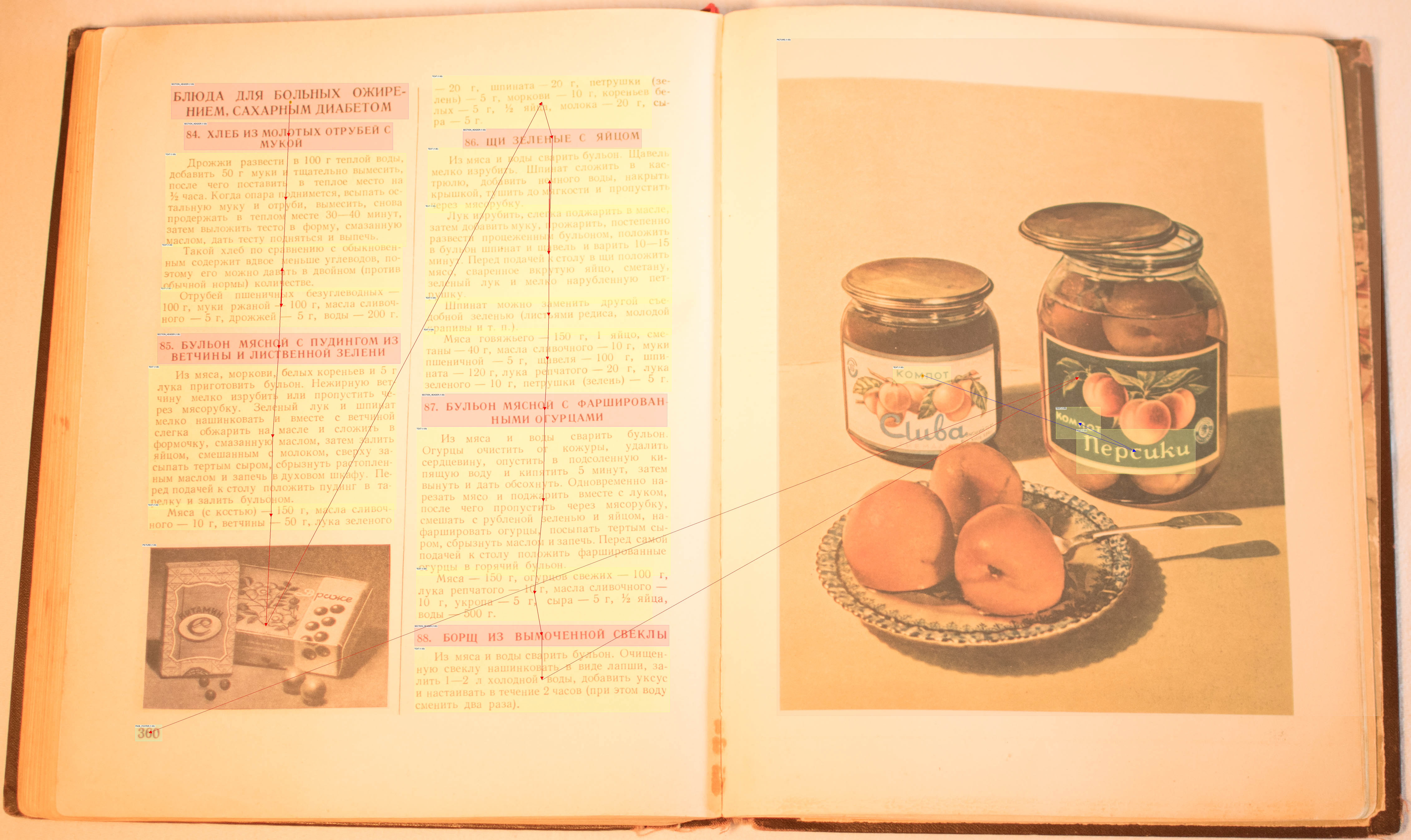
- Page structure. Headings, paragraphs, ingredient lists, and tables were detected and grouped correctly. Docling also read text out of the embedded product photographs, including the label wording on a pictured can of peaches.
The reading-order debug view shows the detected regions on one page:
What broke
Page geometry was a hard limitation. Where a page curved or angled away from the camera, the text no longer fit the rigid rectangular bounding boxes OCR expects, and Docling dropped those regions. In the page below, the text in the upper-right corner is missing from the extraction:
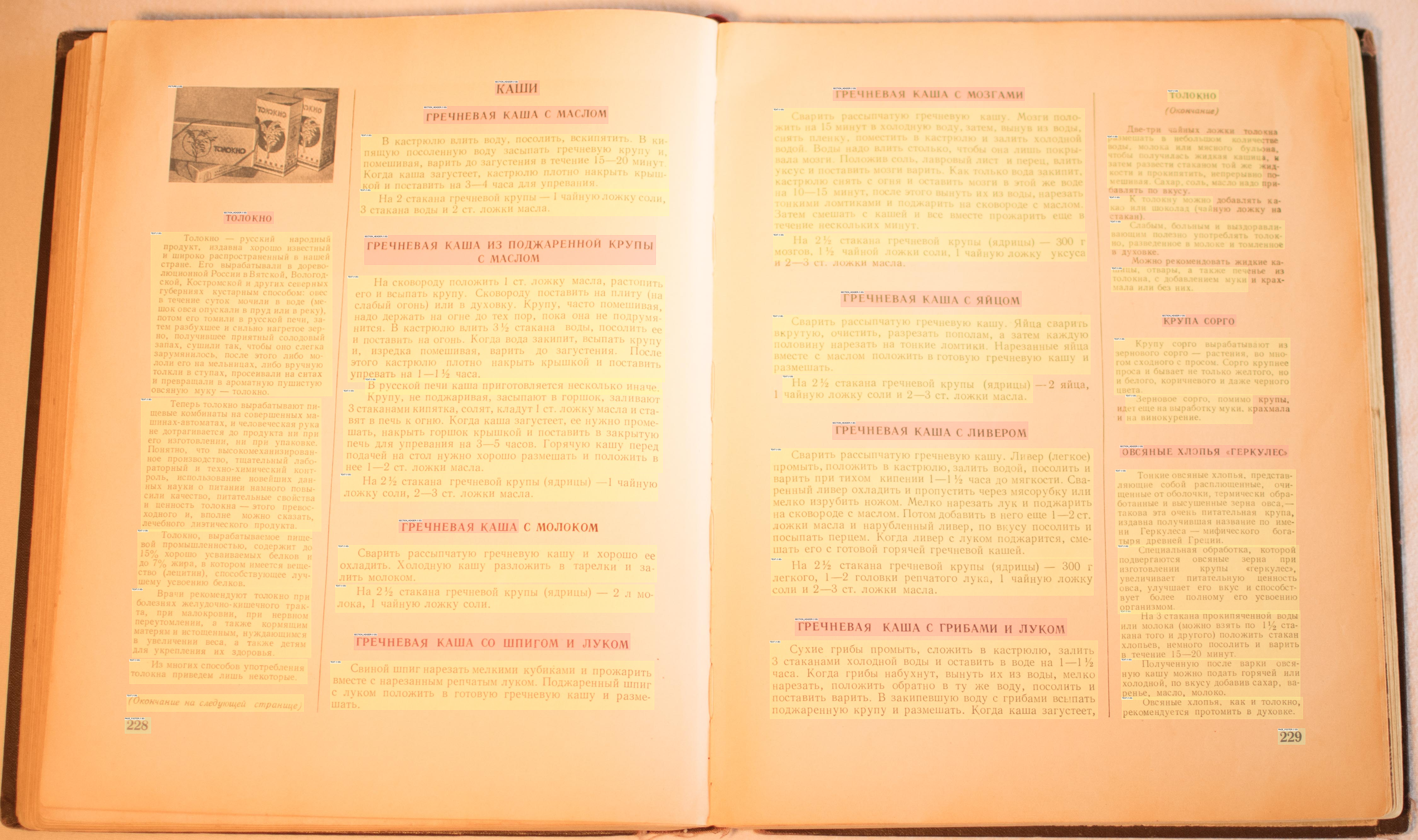
The missing text was absent rather than garbled, so a post-OCR cleanup pass cannot recover it.
Conclusion
Docling with EasyOCR is not sufficient on its own. It handles Cyrillic text and page structure well, but it loses recipes and data on curved or angled pages, and that loss is unrecoverable downstream. Full extraction needs additional steps.
Next
Two directions to try:
- A vision-language model. Docling's vision-language model pipeline processes each page as an image with a VLM instead of running layout analysis plus OCR. A VLM reads text from context rather than from fixed bounding boxes, so it should be more tolerant of curvature and angle. The target model is Qwen3-VL run locally.
- Image preprocessing before OCR. Clean up each page image first with OpenCV: rectilinear alignment and de-warping to flatten the curved text, plus contrast boosting and sharpening. This keeps the existing OCR pipeline and attacks the geometry problem at its source.
The broader plan for this phase is in the phase-two planning post.
The build session
I used Kiro.dev to write the script and recorded the session. Kiro imported modules that do not exist, proposed OCR engines I had not installed, and added GPU handling for components that do not use the GPU. Correcting those was part of the process, and the script worked once they were cleaned up. The full recording runs 36 minutes, debugging included, with some AI-generated music over it:
The phase-two planning post budgeted 6–12 hours for the Docling approach. Writing this script with Kiro took 36 minutes. That 36 minutes only covers the proof-of-concept on four sample pages. The estimate also includes install, tuning, and the full 224-page run. Even so, the scripting step landed far under the low end of the range.